Baby Food & Allergen Tracker
Know exactly what happened.
The food diary built for Thursday's appointment.
A baby allergen tracker for first foods. Log what your baby ate, track any reactions, and export a PDF your doctor can actually use. Core data is local by default.
This app is a record-keeping tool, not a medical device. Always follow your doctor's guidance.

 Coming soon — clicktap to get notified
Free to download. Premium from US$2.99/month or US$24.99/year; prices vary by country.
No accounts. No servers. Read how we protect your family's privacy →

the situation
You logged it.
But can you find it?
"It's Thursday at 2pm."
Your paediatrician asks what exactly happened last Tuesday. You scroll through your phone notes. You think it was the egg. Or maybe the peanut butter. You can't say for certain.
"Your mum watched the baby on Wednesday."
She thinks she wrote something down. You try to piece together what happened from a WhatsApp thread and two voicemails.
"Rash on her cheek after lunch."
You noted it in your reminders app. But which lunch? Which food? How bad, exactly? A week later, you genuinely can't recall.
On your laptop? Scan to grab it on your phone.
Point your iPhone camera at the code and the App Store listing opens straight up. No typing, no searching.
Or open the App Store link →step by step
Three steps between a reaction
and your doctor's report.
-
Step 01
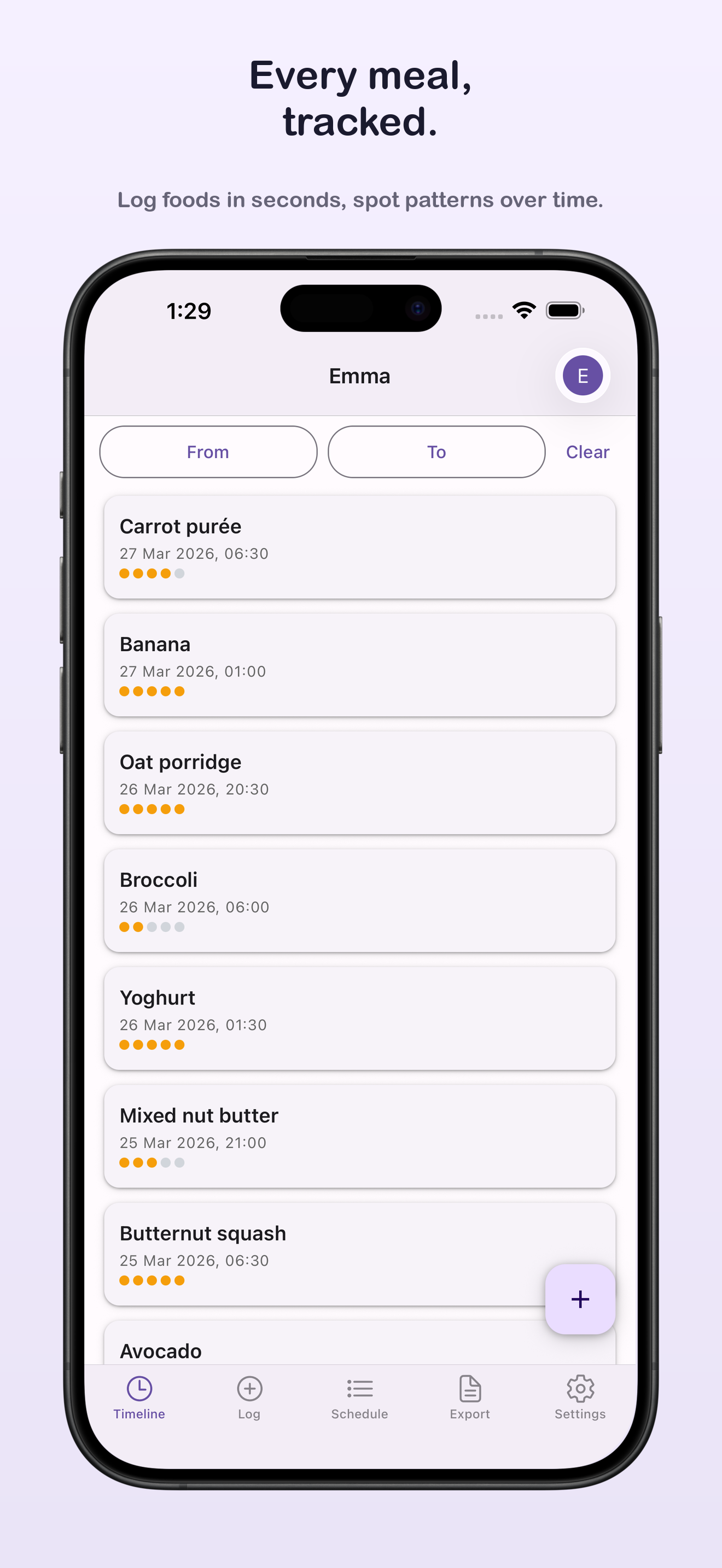
Log the food
Add what baby ate, the portion size, and any notes. Takes about 20 seconds.
-
Step 02
Record any reaction
Log symptoms and severity. The app links the reaction to the meal automatically.

-
Step 03
Export for your appointment
Generate a PDF with the full diary, reaction timeline, and allergen progress. Hand it to your doctor.


features
Everything in one place.
- Food diary
- Daily log with foods, portion sizes, meal times, and notes from any caregiver.
- Reaction tracking
- Log symptoms, severity score, and timing. See which foods correlate with reactions over time.
- For record-keeping only — does not diagnose allergies.
- Allergen schedule Premium
- Track introduction progress for all 14 major allergens. Know exactly which ones have been introduced and when.
- PDF export Premium
- One tap generates a paediatrician-ready PDF. No formatting, no copy-pasting — just hand it over.
- Caregiver sharing Premium
- Your partner or nanny logs from a browser. No app download, no account required on their end.
- Fully offline
- No internet required for core logging. Optional caregiver sharing uses your own Google Drive. Works in airplane mode, in the waiting room, anywhere.
- First 100 Foods Tracker
- Watch food variety grow across veg, fruit, protein, grains, and dairy. Free for your first 12 foods.
- Premium unlocks the full 100 Foods Board with shareable milestone cards.
- Secure, self-managed backups
- Export an encrypted backup file anytime and restore it in seconds. No cloud account, no subscription, no third party ever touches your child's data.
- Multiple children
- Switch between kids in one tap. Each child gets their own timeline, allergen schedule, and reports — no mixing up whose reaction was whose.
- Backdate entries
- Forgot to log lunch? Add it for the time it actually happened, not just now. Keeps the timeline accurate even when logging happens late.

Watch food variety grow, not just reactions.
Every food your baby tries gets grouped into veg, fruit, protein, grains, and dairy, so gaps in variety are obvious at a glance. Free tracks your first 12 foods. Premium unlocks the full 100 Foods Board with shareable milestone cards for grandparents.

Inviting a caregiver takes one tap.
Show a QR code if they're standing next to you, or send a link if they're not. They open it — no app download, no account — and they're straight into logging.
See what the app generates
Real examples from the app (PDF reports export in your language or English) — open them to see exactly what you'll share with your doctor or daycare.
Zero trackers. Zero cookies. 100% on-device.
Apple's App Store privacy label for Log: Baby Solid Food & Allergy lists a single data type: Purchases, so Premium works. No health, usage, location or contact data is collected. No accounts to create. No ad tracking. No company servers.
- No Account Required
- Start logging meals and reactions instantly on your iPhone. Nothing to sign up for.
- Your Log Stays on Your Phone
- Core food diary data stays on your local device. Optional caregiver sync uses your encrypted Google Drive.
- COPPA & Medical Privacy
- We don't operate baby data servers or sell user profiles. Pediatrician reports export fully offline.
pricing
Simple pricing.
Free
$0 forever
- ✓ Single child
- ✓ Complete food diary
- ✓ Reaction log with severity tracking
- ✓ All 14 major allergens supported
- ✓ First 100 Foods Tracker (first 12 foods)
- ✓ Secure, self-managed encrypted backups
- ✓ No account, no sign-up
- ✓ Fully offline, on-device
Premium
US$2.99 / month or US$24.99 / year
Yearly includes a 1-week free trial.
- ✓ Everything in Free
- ✓ Allergen introduction tracker
- ✓ Multiple children
- ✓ PDF export for doctor appointments
- ✓ Full 100 Foods Board with shareable milestone cards
- ✓ Optional Caregiver Sync (via your Google Drive)
Prices in US dollars. Your App Store price depends on your country.
Coming from a general baby tracker or a food guide app? See the Solid Starts, Huckleberry and Nara Baby alternatives compared.
In one minute
What it does and who it's for
What it does
- Logs every food your baby tries, with the date, time, enjoyment, notes and up to 3 photos.
- Records reactions with 10 symptom types, a Mild, Moderate or Severe rating, when symptoms started, and follow-up notes.
- Tracks 14-day allergen introduction windows for the US, EU or Australia/NZ allergen list, plus your own custom allergens.
- Groups everything you have logged into Avoid, Watch, In progress and Logged OK, so you can see what needs attention.
- Exports PDF summaries for appointments, daycare and grandparents.
Who it's for
- Parents starting solids, from about 4 to 18 months, whether you do baby-led weaning, purées or both.
- Families introducing allergens one at a time who want a clear record of what happened.
- Families managing a cow's milk protein allergy (CMPA), eczema or an allergy history who want a clear record of foods and reactions for their doctor.
- Parents who share feeding with a partner, nanny, daycare or grandparent.
- Anyone who wants the log kept on their own phone, with no account.
Focused by design
- It records what happened. Medical decisions stay with your paediatrician or allergist, so it doesn't diagnose allergies or tell you when to introduce foods.
- For a severe reaction, call emergency services first. You can log it afterwards.
- It focuses on solids and allergens, so it works alongside whatever you use for sleep and milk feeds.
- It's built for iPhone.
- Your log stays on your phone, not on our servers. Encrypted backup files and backup reminders keep you in control of it.
FAQ
Frequently asked questions
- What age is this app designed for?
- It is designed for parents introducing solid foods to babies from about 4 months to 18 months, covering the whole weaning and allergen introduction period. It works for baby-led weaning (BLW), spoon-feeding, or a mix of both.
- Does the app work offline?
- Yes. Logging foods and reactions, the allergen schedule, the Food Status board and PDF exports all work without an internet connection. Only caregiver sharing and subscription purchases need a connection.
- Is this available on Android?
- Not yet. The app is available for iPhone on the App Store and needs iOS 18 or later. There is no Android, iPad, Apple Watch or web version yet.
- Which allergens does the app track?
- You choose a list when you set up the app: the US list of 9 major allergens (including sesame), the EU list of 14, or the Australia/New Zealand list of 12. You can also add custom allergens for anything else your family wants to watch.
- Can my partner, nanny or grandparent log meals too?
- Yes, with caregiver sharing. Setting it up needs Premium on your phone; receiving is free. Both people need an iPhone and a Google account. Entries are encrypted on the phone and synced through your own Google Drive. Your baby's name, photo and date of birth are never shared.
- Does the app store my baby's data on its servers?
- No. There are no company servers. Apple's App Store privacy label for Log: Baby Solid Food & Allergy lists a single data type, Purchases, so Premium works. Your food diary lives on your phone. There are no ad trackers, no analytics SDKs and no cookies. If you use caregiver sharing, entries are encrypted on your phone before they reach your own Google Drive.
- What happens if I lose my phone?
- Your log is stored on your phone, not on our servers, so it stays under your control. Make an encrypted, password-protected backup file in Settings and save it wherever you like, such as iCloud Drive or your computer. Backup reminders can prompt you after a set time or after you've logged a certain amount. On a new phone, install the app and restore the file. Caregiver sharing isn't a backup.
- What is the difference between Free and Premium?
- Free includes unlimited food and reaction logs with photos, the Timeline, the Food Status board, backups, one child, 2 allergens on the schedule, the first 12 of the First 100 Foods, and sample PDF reports. Premium is a monthly or annual subscription that adds every allergen, full-history PDFs without a watermark, more children, setting up caregiver sharing, and the full First 100 Foods board with milestone cards.
- Is this a medical tool?
- No. It is a food diary and record-keeping tool. It does not diagnose food allergies, give medical advice, or replace your paediatrician or allergist. If your child is having a severe allergic reaction, call emergency services immediately.